Veho Wallet Guide
Veho is a last-mile delivery and returns service carrier with limited service in the United States.
EasyPost supports Veho through two account options:
- Veho Wallet: Use Veho through an EasyPost Wallet without establishing a separate billing relationship with Veho. Shipment charges are billed through EasyPost.
- Veho BYOCA: Connect an existing Veho account to EasyPost using credentials provided by Veho. Billing is handled directly by Veho.
This guide includes detailed information on utilizing Veho Wallet shipping with the EasyPost API, focusing on account setup, rates, billing, label creation, pickups, tracking, and more.
Sign up for an EasyPost account to obtain a Test and Production API key. See Authentication and Key Management for more information.
Note: EasyPost negotiated rates are only available in Production mode.
- Log in to EasyPost and navigate to Account Settings.
- Select the Carriers tab.
- Select the EasyPost Wallet Carriers tab.
- Find Veho in the list of carriers and select Create Account.
The API structure specified by EasyPost can also be used to add a Veho Wallet carrier account.
The Veho Wallet carrier account includes the following fields:
company: Merchant company name.agreed_to_terms_at: Timestamp when Veho terms were accepted.
curl -X POST https://api.easypost.com/v2/carrier_accounts/open \
  -u "$EASYPOST_API_KEY": \
  -H 'Content-Type: application/json' \
  -d '{
  "carrier_account": {
    "type": "VehoWalletAccount",
    "description": "VehoWalletAccount",
    "credentials": {
      "agreed_to_terms_at": "VALUE"
    },
    "payment_mode": "aggregation"
  }
}'
Download an EasyPost Client Library or utilize the REST API with cURL.
Examine the EasyPost Objects section to understand the API's structure, which is critical for constructing requests and interpreting responses.
Veho Wallet uses API-based live rating.
Billing is handled through the EasyPost Wallet. Shipment charges are deducted directly from the customer's EasyPost Wallet.
If Veho determines that shipment details differ from the information provided when the label was purchased, the shipment may be subject to a billing adjustment. Any resulting charge or credit is applied to the EasyPost Wallet.
Veho Wallet supports one service level:
Service | Description |
|---|---|
| groundPlusOne | The Veho Wallet service level available through EasyPost |
Veho currently operates in limited areas within the United States.
Note: Veho Wallet shipments must originate from Atlanta, GA.
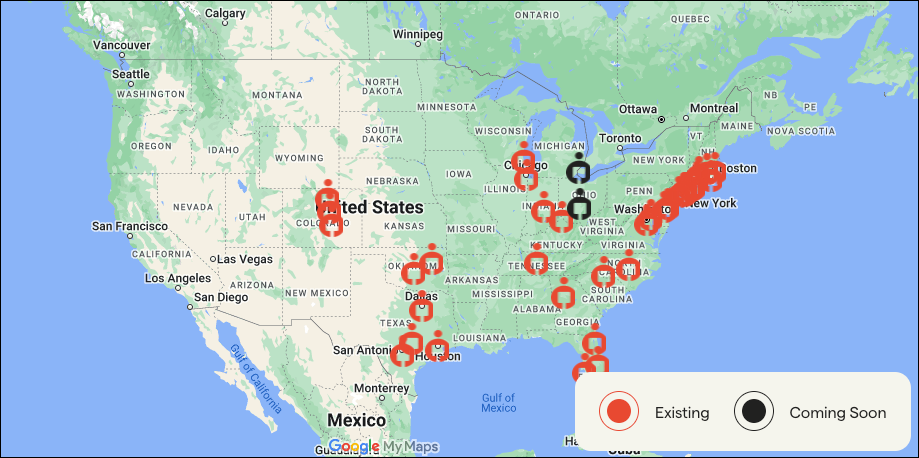
For Veho coverage details, visit Veho's service area page.
Predefined packages provide a convenient way to classify parcels using carrier-defined package types and retrieve applicable rates.
When creating a shipment with the EasyPost API, select a predefined package that matches the parcel's characteristics and provide its weight in ounces when required. See the predefined package documentation for supported values and example requests.
Predefined Package |
|---|
| There are no predefined packages for this carrier. |
Parcel Questions | Answer |
|---|---|
| Max weight per parcel | 50 lbs actual weight |
| Max dimensions per parcel | 48 inches in length |
| Standard delivery days | Monday to Sunday |
| Standard delivery times | 8 a.m. - 10 p.m. |
| Delivers on public/local holidays | Yes |
| Delivery attempts | 2 delivery attempts |
| Picture POD available | Yes |
| Signature service available | Not currently |
With EasyPost, generating shipping labels for Veho Wallet is the same process as generating them for any other carrier.
Review the Getting Started Guide for help generating a shipping label.
Buying labels and one-call buys are supported via API.
See Reducing API Response Times for more information.
Shipment Option |
|---|
| There are no shipment options for this carrier. |
Veho Wallet labels are available in PNG, PDF, and ZPL formats.
Voiding labels is supported through the EasyPost API.
Returns are not supported.
Veho Wallet does not support hazardous materials.
Pickup purchasing is currently supported only in Atlanta, with expansion forthcoming to Los Angeles, Dallas, Philadelphia and Chicago before the end of 2026 via API with the following constraints:
- Minimum of 20 shipments.
- Minimum 3-hour pickup window.
- Currently supported only in Atlanta.
Veho pickups are billed at a fixed rate and can be voided through the API.
Tracking is supported via API and webhooks.
EasyPost simplifies package tracking by offering two methods:
- Tracking with an existing number and carrier.
- Using a Tracker included with an EasyPost-purchased shipping label.
The service integrates webhooks for timely shipment updates. For detailed information on tracking methods, visit the Tracking Guide.
The Carrier Metadata endpoint can programmatically return information about service levels, predefined packages, supported features, and shipment options.
In addition to the guidance provided in our Carrier Guides, EasyPost offers support to assist with FAQs, troubleshooting issues, and inquiries related to the EasyPost platform.
Please visit the Help Center for more information.
For questions about getting started with Veho Wallet through the EasyPost API please talk to a Shipping Expert or contact our Support team.