DHL Express Wallet Guide
DHL Express is the international shipping division of Deutsche Post DHL, a global leader in express logistics. DHL Express facilitates cross-border shipping across numerous countries and territories worldwide, making it an ideal choice for businesses needing reliable international logistics solutions.
Domestic Shipments: DHL Express provides support for domestic shipments in many countries around the world. This service enables businesses to efficiently manage their regional logistics needs. However, it’s important to note that DHL Express does not offer domestic shipping services within the U.S. and Canada, where its operations are focused exclusively on international shipments.
DHL Express uniquely assigns users an import or export account based on their specific shipping needs. All DHL Express customers are provided with an export account by default. Import accounts are established only if a customer requires a dedicated returns service through DHL Express.
This guide includes detailed information on utilizing EasyPost for shipping with DHL Express, focusing on account setup, rate retrieval, and label generation.
EasyPost supports DHL Express through two account options:
- DHL Express Wallet: Use an EasyPost-managed DHL Express account with EasyPost Wallet billing.
- DHL Express BYOCA: Connect an existing DHL Express account to EasyPost with carrier-provided credentials and carrier-direct billing.
Sign up for an EasyPost account to obtain a Test and Production API key. See Authentication and Key Management for more information.
Note: Negotiated rates are only available in Production mode.
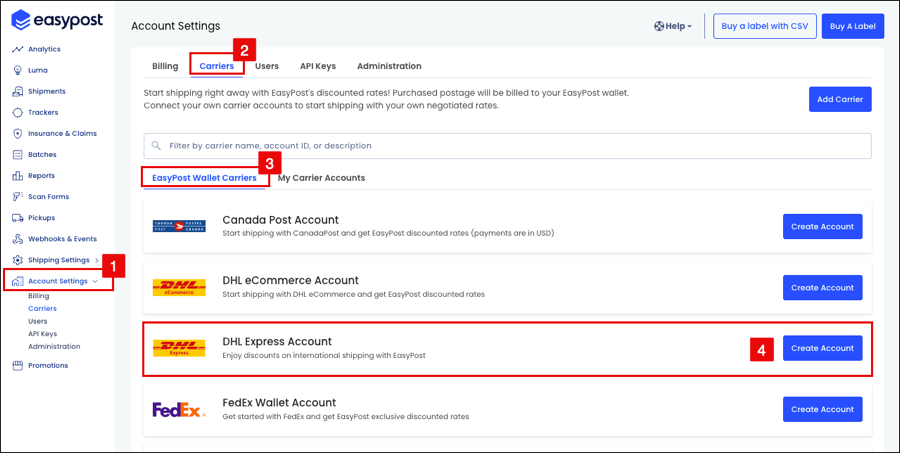
- Log in to EasyPost and navigate to Account Settings.
- Select the Carriers tab.
- Select the EasyPost Wallet Carriers tab.
- Find DHL Express in the list of carriers and select Create Account to complete the account creation process.
The API structure specified by EasyPost can also be used to add a DHL Express Wallet carrier account.
curl -X POST https://api.easypost.com/v2/carrier_accounts \
  -u "$EASYPOST_API_KEY": \
  -H 'Content-Type: application/json' \
  -d '{
  "carrier_account": {
    "type": "DhlExpressAccount",
    "description": "DhlExpressAccount",
    "payment_mode": "aggregation"
  }
}'
Download an EasyPost Client Library or utilize the REST API with cURL.
Examine the EasyPost Objects section to understand the API's structure, which is critical for constructing requests and interpreting responses.
DHL Express offers real-time rates for shipments created via EasyPost.
- All DHL Express rating calls must be made with parcel dimensions, otherwise the call will result in an error.
- For reseller accounts, users must upload their rate table to receive negotiated rates. Contact support@easypost.com for assistance.
When shipping with a Wallet Carrier account, billing is managed entirely through the EasyPost Wallet.
- All charges are consolidated and billed through EasyPost.
- Rates are pre-negotiated; no direct billing occurs between the shipper and DHL Express.
- Bill-on-Scan: Charges are applied when the carrier first scans the package.
DHL Express provides several service levels with specific transit times, dimensions, and weight limits.
DHL Express has several predefined packages supported by EasyPost. Predefined packages are an easy way to classify and price a package.
Predefined Package |
|---|
| DHLExpressEnvelope |
| DHLFlyer |
| Document |
| Domestic |
| ExpressDocument |
| JumboBox |
| JumboDocument |
| JumboJuniorDocument |
| JumboJuniorParcel |
| JumboParcel |
| JuniorJumboBox |
| OtherDHLPackaging |
| Parcel |
| YourPackaging |
With EasyPost, the process for generating shipping labels for DHL Express is the same as generating them for any other carrier.
Review the Getting Started Guide for help generating a shipping label.
Voiding DHL Express labels through EasyPost is supported.
Native DHL Express labels are available in PDF, PNG, and ZPL formats.
Manifesting is not supported or required.
When shipping hazardous materials or dangerous goods via DHL Express, it is crucial to adhere to specific regulations and guidelines to ensure safety and compliance.
To learn more please visit the DHL Express resource: Shipping Dangerous Goods.
Hazardous shipping is specified using the shipment.options object. Supported values include:
- “LITHIUM”
- “PI965-II”
- “PI966-II”
- “PI967-II”
- “PI969-II”
{
  "shipment": {
    "to_address": {
      "name": "Dr. Steve Brule",
      "street1": "179 N Harbor Dr",
      "city": "Redondo Beach",
      "state": "CA",
      "zip": "90277",
      "country": "US",
      "phone": "8573875756",
      "email": "dr_steve_brule@gmail.com"
    },
    "from_address": {
      "name": "EasyPost",
      "street1": "417 Montgomery Street",
      "street2": "5th Floor",
      "city": "San Francisco",
      "state": "CA",
      "zip": "94104",
      "country": "US",
      "phone": "4153334445",
      "email": "support@easypost.com"
    },
    "parcel": {
      "weight": "23"
    },
    "options": {
      "hazmat": "LITHIUM"
    }
  }
}
DHL Express pickup requests can be made via the EasyPost API. Review the Pickups documentation for details.
Note: Pickups may incur charges; users should consult their DHL Express account representative for pricing details.
EasyPost simplifies package tracking by offering two methods:
- Tracking with an existing number and carrier.
- Using a Tracker included with an EasyPost-purchased shipping label.
The service integrates webhooks for timely shipment updates. For detailed information on tracking methods, visit the Tracking Guide.
The Carrier Metadata endpoint can programmatically return information about service levels, predefined packages, supported features, and shipment options.
Use this information to quickly integrate and make educated decisions about the mix of carriers for shipping needs. Additionally, the Carrier Metadata endpoint is available to retrieve comprehensive information about all carriers on the EasyPost platform, enhancing decision-making for carrier services.
In addition to the guidance provided in our Carrier Guides, EasyPost offers support to assist with FAQs, troubleshooting issues, and inquiries related to the EasyPost platform.
Please visit the Help Center for more information.
For questions about getting started with the EasyPost API please talk to a Shipping Expert or contact our Support team.