DHL eCommerce Wallet Guide
DHL eCommerce provides specialized, value-driven shipping solutions for B2C and C2C customers, focusing on lightweight (under 5 lb) international parcel delivery using the USPS as the first mile. EasyPost provides an integrated DHL eCommerce account with discounted international rates and no minimum volume or contracts required.
This guide covers integration using the EasyPost-provided account, also known as the Wallet account.
Note: DHL eCommerce Wallet is a consumer-to-consumer (C2C) or business-to-consumer (B2C) service. Packages cannot be shipped to businesses.
Sign up for an EasyPost account to obtain a Test and Production API key. See Authentication and Key Management for more information.
Note: Negotiated rates are only available in Production mode.
-
Log in to EasyPost and navigate to Account Settings.
-
Select the Carriers tab.
-
Select the EasyPost Wallet Carriers tab.
-
Find DHL eCommerce in the list of carriers and select Create Account to complete the account creation process.
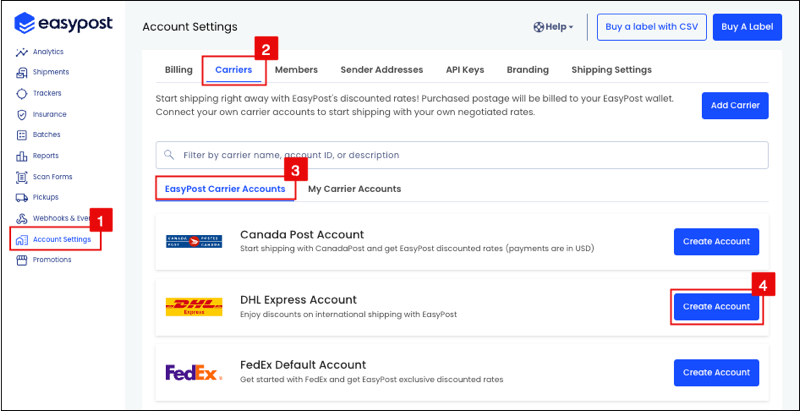
The API structure specified by EasyPost can also be used to add the DHL eCommerce Wallet account.
curl -X POST https://api.easypost.com/v2/carrier_accounts \
  -u "$EASYPOST_API_KEY": \
  -H 'Content-Type: application/json' \
  -d '{
  "carrier_account": {
    "type": "DhlEcsAccount",
    "description": "DhlEcsAccount",
    "payment_mode": "aggregation"
  }
}'
Download an EasyPost Client Library or utilize the REST API with cURL.
Examine the EasyPost Objects section to understand the API's structure, which is critical for constructing requests and interpreting responses.
When utilizing the EasyPost DHL eCommerce Wallet account, billing occurs directly through EasyPost, deducting label fees from the EasyPost wallet. For the purchase of labels in a production environment, sufficient funds must be available in the wallet to cover the cost of the label.
Should there be any price adjustments post-purchase of labels and the shipment of physical items, EasyPost will modify the final amount deducted from the wallet accordingly.
Discounted service levels included with the DHL eCommerce Wallet account provide U.S. export coverage to over 220+ countries worldwide. Visit DHL eCommerce’s website for detailed information on international shipping services.
Service | Description |
|---|---|
| DHLParcelExpedited | Domestic |
| DHLParcelExpeditedMax | Domestic |
| DHLParcelGround | Domestic |
| DHLParcelInternationalDirect | International |
| DHLParcelInternationalDirectMAX | Canada to US International |
| DHLParcelInternationalStandard | International |
| DHLPacketInternational | International |
| DHLParcelInternationalDirectPriority | Canada to US International |
| DHLParcelInternationalDirectStandard | Canada to US International |
| DHLParcelInternationalDirectSMB | |
| DHLParcelInternationalStandardSMB | |
| DHLBPMExpedited | Domestic |
| DHLBPMGround | Domestic |
| DHLSmartMailParcelReturnGround | Domestic |
| DHLSmartMailParcelReturnPlus | Domestic |
| DHLSmartMailParcelReturnLight | Domestic |
DHL eCommerce may not return rates for specific services during a standard rating call with EasyPost. However, these services can still be accessed through the API using a unique method known as the ‘one-call buy'.
For international shipping via DHL eCommerce, it’s important to understand two INCOTERMS: DDU and DDP, which dictate the payment of important duties and taxes:
- DDU: The recipient is responsible for paying any import duties and taxes.
- DDP: The shipper pays all costs, including import duties and taxes, ensuring hassle-free delivery for the recipient.
Choosing between DDU and DDP affects how duties and taxes are managed, influencing the overall shipping process. See DDP vs DDU for E-Commerce Business for more information.
Pre-pay for duties and taxes as part of the label cost to provide a seamless delivery experience for customers, or select a DDU option to leave duties and taxes to the recipient. EasyPost integrates DHL’s Duty & Tax Calculator to help estimate accurate shipping costs. The label cost returned by EasyPost reflects the final price* when DDP is selected.
For example, when shipping with DHL Parcel International Direct SMB, the label rate at checkout includes applicable duties and taxes.
*Use caution during peak season, as seasonal surcharges may not be included. DDP services, such as DHL Parcel International Direct SMB, include duties and taxes in the label cost, while DDU services pass those charges to the recipient.
- DHL eCommerce - Parcel International Direct
- DHL eCommerce - Parcel International Standard
- DHL eCommerce - Packet International
Note: This solution leverages USPS for first-mile delivery into a DHL eCommerce facility. From there, DHL eCommerce handles the movement of the parcel to the destination country and hands it off for final-mile delivery to a trusted third-party partner.
There are no predefined packages for DHL eCommerce.
Generating shipping labels for DHL eCommerce requires specific fields during the shipping creation process.
Note: It's very important to review the
DHL eCommerce Wallet International Shipping Guide
for detailed instructions in order to obtain rates and shipping labels.
One-call buys enable streamlined label purchasing through the EasyPost API by consolidating multiple operations into a single API request. This feature is designed to simplify and accelerate the shipping process by combining the creation of a shipment, retrieval of rates, and purchasing the shipping label into one efficient step.
See Reducing API Response Times for more information.
DHL eCommerce supports PNG and ZPL labels.
The standard label size is 4 x 6.
When shipping to a country with customs clearance, all shipments will be checked by customs in that country. Therefore, it is mandatory to include the customs forms with shipments.
EasyPost offers a Customs Guide that outlines the process for including customs information in shipments. This guide enables the automatic generation of required customs forms for international shipping between two countries.
Return services are not available with EasyPost DHL eCommerce Wallet accounts.
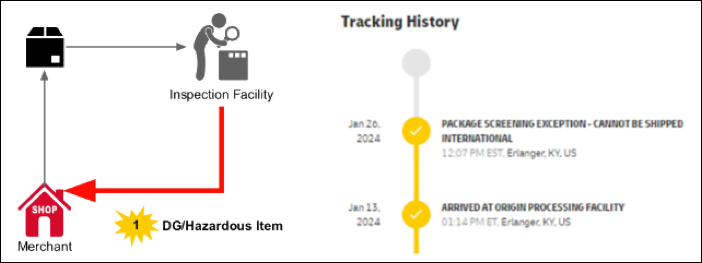
When utilizing the DHL eCommerce Wallet account, dangerous goods or hazardous items that are flagged during the inspection process cannot be shipped in the DHL eCommerce network. These items will be returned by the inspection facility.
Return charges incurred by the inspection facility are submitted by DHL eCommerce as a debit to the customer’s account.
Dangerous Goods/Hazardous items are returned weekly, and the inspection facility issues a report with the issue summary and return tracking details.
EasyPost DHL eCommerce Wallet account shipments must be handed off to USPS via either drop-off or pickup. USPS will transfer the package to DHL eCommerce for delivery on the shipper’s behalf.
Manifesting DHL eCommerce shipments serves two primary functions:
-
Electronic Data Transmission: It fulfills the DHL eCommerce requirement of electronically transmitting shipment data.
-
Driver Manifest Shipment Summary: Generates a summary document needed for DHL eCommerce driver pickup.
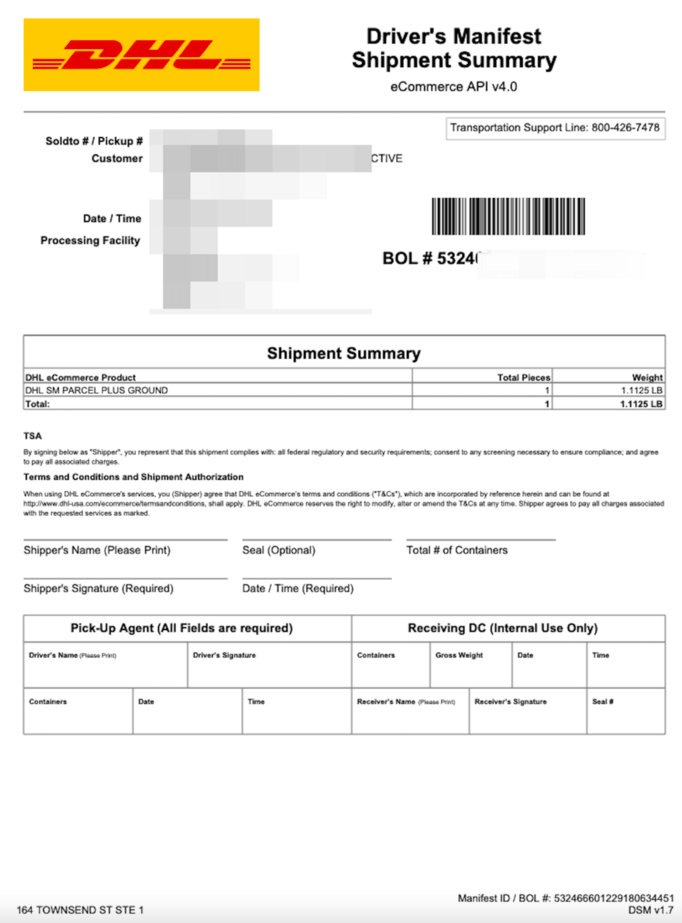
Manifesting is not instantaneous and may take several minutes to complete and receive a manifest document.
Immediate receipt of a driver manifest summary is not possible; it becomes available shortly after the manifesting process:
-
Create a batch with a list of shipments (or add shipments to the batch throughout the day).
-
Batch Processing
- Option A: Wait approximately 1-3 seconds for the batch creation to complete.
- Option B: Monitor for a
batch.updatedwebhook event indicating thebatch.statehas changed tocreated.
Note: Initiating the next step during the “creating” status leads to errors.
-
Execute the manifest
scan_formbatch. -
Manifest Confirmation
- Option A: Wait up to five minutes and retrieve the
scan_formto confirm completion. - Option B: Use webhooks to wait for the
scan_form.updatedevent and obtain the manifest document URL at that time.
- Option A: Wait up to five minutes and retrieve the
DHL eCommerce tracking operates similarly to other carriers integrated with EasyPost.
- DHL may transfer packages to USPS for last-mile delivery within the United States.
- The accuracy of final delivery tracking is contingent upon DHL receiving and then conveying USPS updates to EasyPost.
EasyPost simplifies package tracking by offering two methods:
- Tracking with an existing number and carrier.
- Using a Tracker included with an EasyPost-purchased shipping label.
The service integrates webhooks for timely shipment updates. For detailed information on tracking methods, visit the Tracking Guide.
The Carrier Metadata endpoint can programmatically return information about service levels, predefined packages, supported features, and shipment options.
Use this information to quickly integrate and make educated decisions about the mix of carriers for shipping needs. Additionally, the Carrier Metadata endpoint is available to retrieve comprehensive information about all carriers on the EasyPost platform, enhancing decision-making for carrier services.
In addition to the guidance provided in our Carrier Guides, EasyPost offers support to assist with FAQs, troubleshooting issues, and inquiries related to the EasyPost platform.
Please visit the Help Center for more information.
For questions about getting started with the EasyPost API please Talk to a Shipping Expert or contact our Support team.